
FIELD NOTE // CLOUDFLARE
My Personal Cloudflare Control Panel
The problem with dashboards
After setting up my Cloudflare infrastructure, I kept running into the same small annoyance. Whenever I wanted to block an email address, block a domain or create a new short link, I had to open the Cloudflare dashboard, log in, find the right section and make the change manually.
None of these tasks is difficult. They are just not very convenient when I am away from my computer, especially when I only have my phone with me.
Checking what was already blocked or which links I had created was not much better. I could do it, but it involved more searching than I wanted for something that should be quick.
So I created a small control panel in the place I already use every day: Telegram.
One bot, two jobs
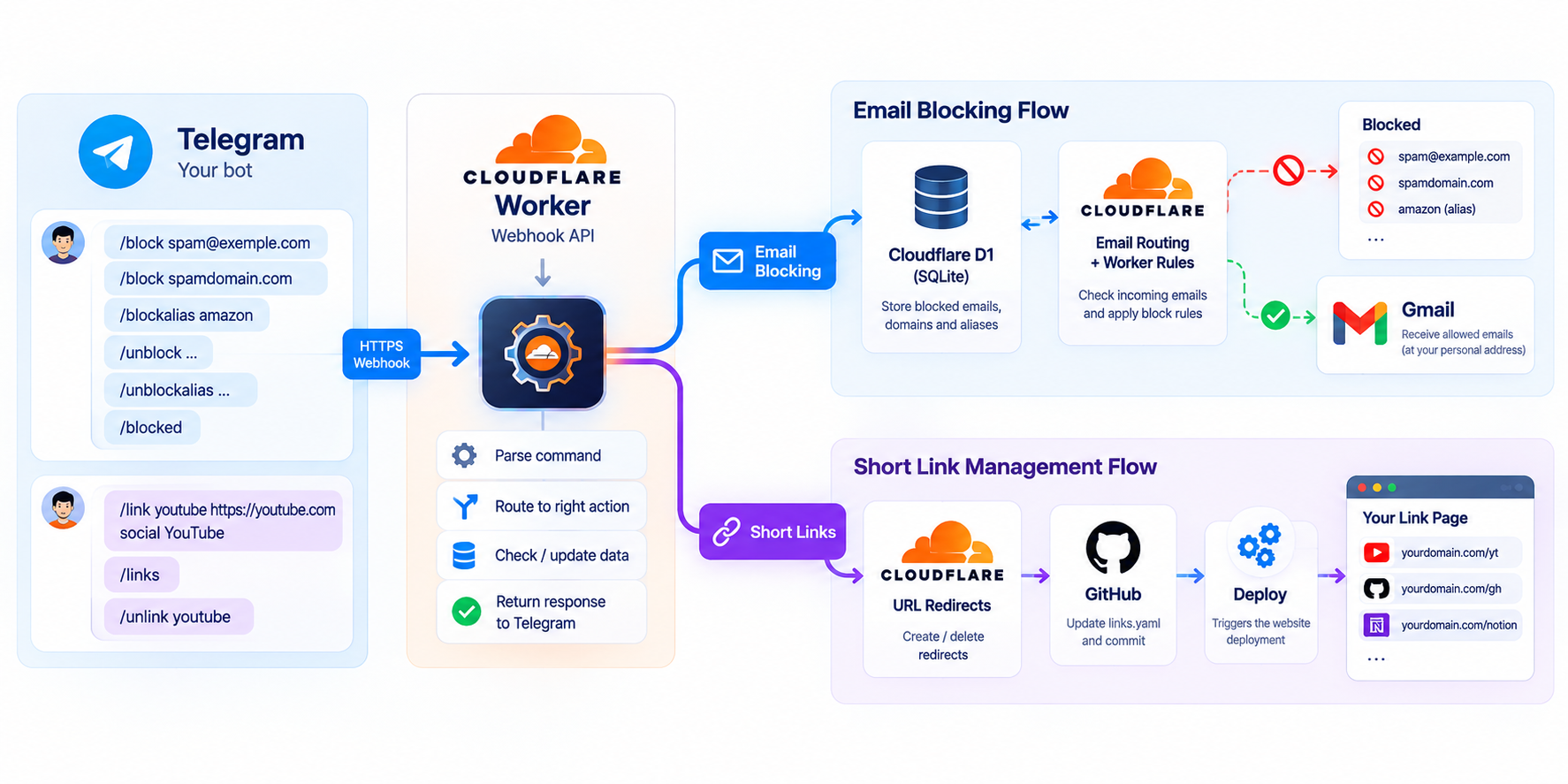
The bot is connected to a Cloudflare Worker through a webhook. I send it a command, the Worker checks what I am asking for and updates the right service.
For email blocks, I can use commands such as /block spam@example.com, /block spamdomain.com or /blockalias amazon. I can remove them with /unblock and /unblockalias, or use /blocked to see the current list.
The entries are stored in a small D1 SQLite database. Before adding a block, the Worker checks whether it already exists. If it does, the bot tells me instead of creating a duplicate. Removing a block simply deletes the corresponding record from the database.
The insert uses SQLite’s INSERT OR IGNORE, so a duplicate is handled by the database instead of creating a second entry:
const result = await db
  .prepare(`
    INSERT OR IGNORE INTO blocked_senders (type, value)
    VALUES (?, ?)
  `)
  .bind(type, value)
  .run();
This keeps the list tidy and helps me stay within the limits of the free setup I am using.
The second job is connected to my short-link project, which I wrote about in I Gave My Bookmarks a Home.
With /link <slug> <url> <category> [name], the bot creates a new Cloudflare redirect and adds the link to the YAML file used by my link page. That means one command does all of this:
- Creates the redirect in Cloudflare.
- Updates the YAML file in my GitHub repository.
- Commits the change, triggering the website deployment.
I can then use /links to receive the complete list of redirects, or /unlink <slug> to remove one. If the GitHub update fails after the Cloudflare redirect has been created, the Worker attempts to roll the redirect back instead of leaving the two systems out of sync.
The actual command I use looks like this: /link youtube https://youtube.com social YouTube. A few seconds later, the short link exists and the page that lists all my links will be updated by the normal deployment workflow.
Keeping the bot private
Because a Telegram bot is public by nature, I didn’t want anyone who found it to be able to change my infrastructure.
The bot is restricted to private chats, and the Worker checks both my Telegram user ID and chat ID. The webhook also includes a secret header, which the Worker validates before it processes anything. If the secret is missing or incorrect, the request is rejected with 401 Unauthorized.
The check is deliberately simple and happens before the message is processed:
const webhookSecret = request.headers.get(
  "X-Telegram-Bot-Api-Secret-Token"
);

if (webhookSecret !== env.TELEGRAM_WEBHOOK_SECRET) {
  return new Response("Unauthorized", { status: 401 });
}
I also disabled the option to add the bot to groups. These checks are simple, but they make a big difference: a random person cannot send a command and create a redirect or change my email blacklist.
A small control panel
This is not a full administration platform. It is a thin layer between Telegram and the services I already use: Cloudflare, GitHub and D1.
But it removed a surprising amount of friction. I can add a link, remove a blocked sender or inspect my current configuration without opening a dashboard or waiting until I am back at my computer.
Sometimes automation is not about building something huge. Sometimes it is just about putting the right button in the place where you already are.
Need help setting up your own Telegram bot? Or do you simply want to talk about this topic? Send me an email at mydomainbotpost@mattao.net 😉