
FIELD NOTE // CANVA
06 - Drawing the Flyers
Content Design
With dozens of cities and daily events, we needed a consistent visual identity. Our goal was to have a clear “Cover Image” for every Instagram Carousel that displayed the City and Date, ensuring users could find what they were looking for at a glance.
Example
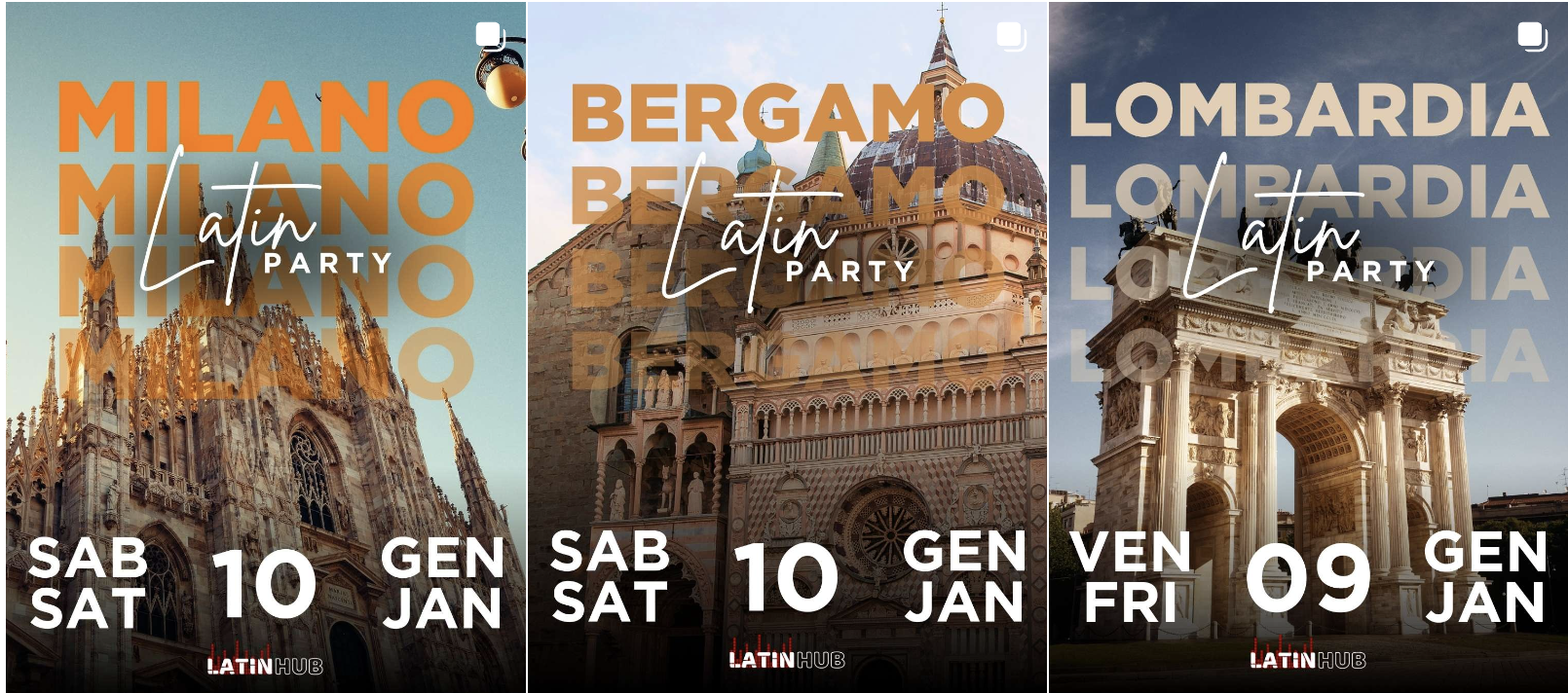
The Challenge
Because we don’t know the party schedule months in advance, we had to pre-produce “Template Covers” for every possible scenario:
- Single Post Covers (When events fit in one carousel).
- Multi-Part Covers (Part 1 & Part 2 for busy nights with 10+ flyers).
- The Volume: This required generating over 2,000 unique images every quarter. Doing this manually would be an 8-hour nightmare prone to human error.
The Solution
I designed a 4-step workflow to handle this:
- Dynamic Date Generator: In the Google Sheets Database, I built a tool where I simply input the “Start Month.” It automatically generates a list of all dates for the next 4 months in the exact format needed for the flyers (e.g. Monday June 2nd, “LUN MON 02 GEN JAN”).
- Canva Bulk Create: I designed templates for each city in Canva. By importing the list from Google Sheets into Canva’s Bulk Create Tool, I could generate hundreds of dated flyers in seconds.
- Standardized Naming: Every exported file followed a strict naming convention:
City_Date_Part.jpg. - The Python “Sorter” Script: Once the 2,000+ images were downloaded, I ran a custom Python script on my MacBook.
- The Logic: I input the date range, and the script iterated through the folder, identified the city and date from the filename, and automatically moved each flyer into the correct Month/Date/City sub-folder in “The Warehouse” (Google Drive).
The Win
By automating the data generation and the final sorting, I turned a full day of tedious manual work into a 30-minute supervised process.
- Consistency: Every city now has the exact same branding and font style.
- Accuracy: The Python script ensures that “Milano - March 24” never ends up in the “Roma - March 25” folder.
- Scalability: If we add 10 more cities tomorrow, the workload only increases by a few minutes, not hours.