FIELD NOTE // CLOUDFLARE
Stop Giving Away Your Personal Email
Your email address is not a disposable detail
Every website wants an account.
Every shop wants to send you a discount.
Every newsletter promises that this time it will be worth it.
And before long, your personal email address is everywhere: in databases you forgot about, mailing lists you never asked for, and the occasional breach you only hear about years later.
That inbox is not just noisy. It is an identity you keep handing out without knowing where it will end up.
I wanted a simple way to stop doing that. Not a second inbox, not a self-hosted mail server, and not another app to check every morning.
I wanted to keep using Gmail, but give every service its own address.
The idea: one domain, many addresses
There are several ways to create custom email addresses:
- Buy a domain and host a mail server at home.
- Buy a domain and pay for a hosted email service.
- Use a custom domain as a layer in front of the inbox you already use.
The first two options work, but they also mean dealing with another server, another interface, or another mailbox.
The third option is the one I chose. My personal inbox remains Gmail, while my domain becomes a controllable layer in front of it.
That means I can use addresses such as:
spotify@mydomain.com
youtube@mydomain.com
newsletter@mydomain.com
If one of them starts receiving spam, I disable that address. The rest of my email setup keeps working.
Cloudflare is the missing piece
Cloudflare is usually associated with DNS, caching and Workers, but it also provides an email service with two separate capabilities:
Email Routing
Email Routing receives messages sent to your custom domain and forwards them to a destination address, such as your personal Gmail account.
For personal use, this is the important part: it is free and it gives you control over the addresses that can reach your inbox.
The current limits are generous for a personal domain:
- Up to 200 routing rules per domain.
- Up to 200 verified destination addresses per account.
- A maximum inbound message size of 25 MiB.
- Up to 50 recipients across
To,CcandBcc. - No hard limit on incoming message volume, although Gmail or Outlook may apply their own limits.
More details are available in the Cloudflare Email Service documentation.
Email Sending
Email Sending allows you to send messages from your custom domain. At the moment, it is still in beta and requires a paid subscription.
That is not a blocker. If you only need to receive messages, Email Routing already solves most of the problem.
Setting up the receiving side
The setup is surprisingly straightforward:
- Register a domain with Cloudflare.
- Enable Email Routing.
- Add your personal Gmail address as a verified destination.
- Create routing rules for the custom addresses you want to use.
Cloudflare provides the DNS records required for the service and helps configure the authentication records needed to protect your domain from spoofing.
From that moment on, an email sent to spotify@mydomain.com arrives in my normal Gmail inbox, without requiring a separate mailbox.
The filter in front of my inbox
Routing is useful by itself, but I wanted one more layer of control. With a small Cloudflare Worker, I can inspect incoming messages before forwarding them.
The Worker can check things such as:
- The recipient address.
- The sender.
- The subject.
- A custom rule for a specific service.
The flow is simple:
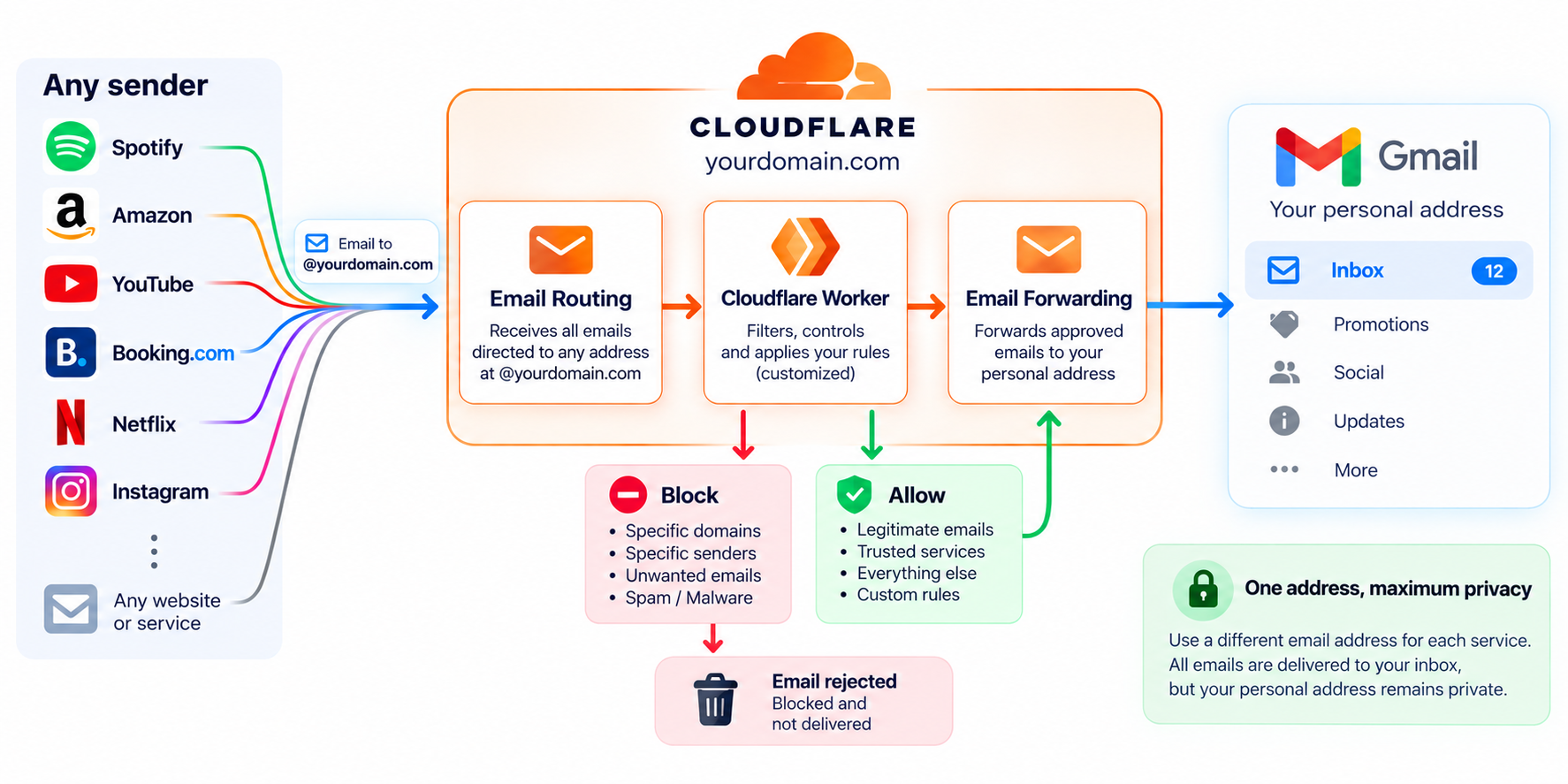
This is where the disposable-address behavior comes from. I do not need to expose my real personal email address to every service, and I do not need to rebuild my mailbox when one address becomes compromised.
Sending from Gmail
Receiving email is only half of the story. Sometimes I also need to send a message using my custom domain.
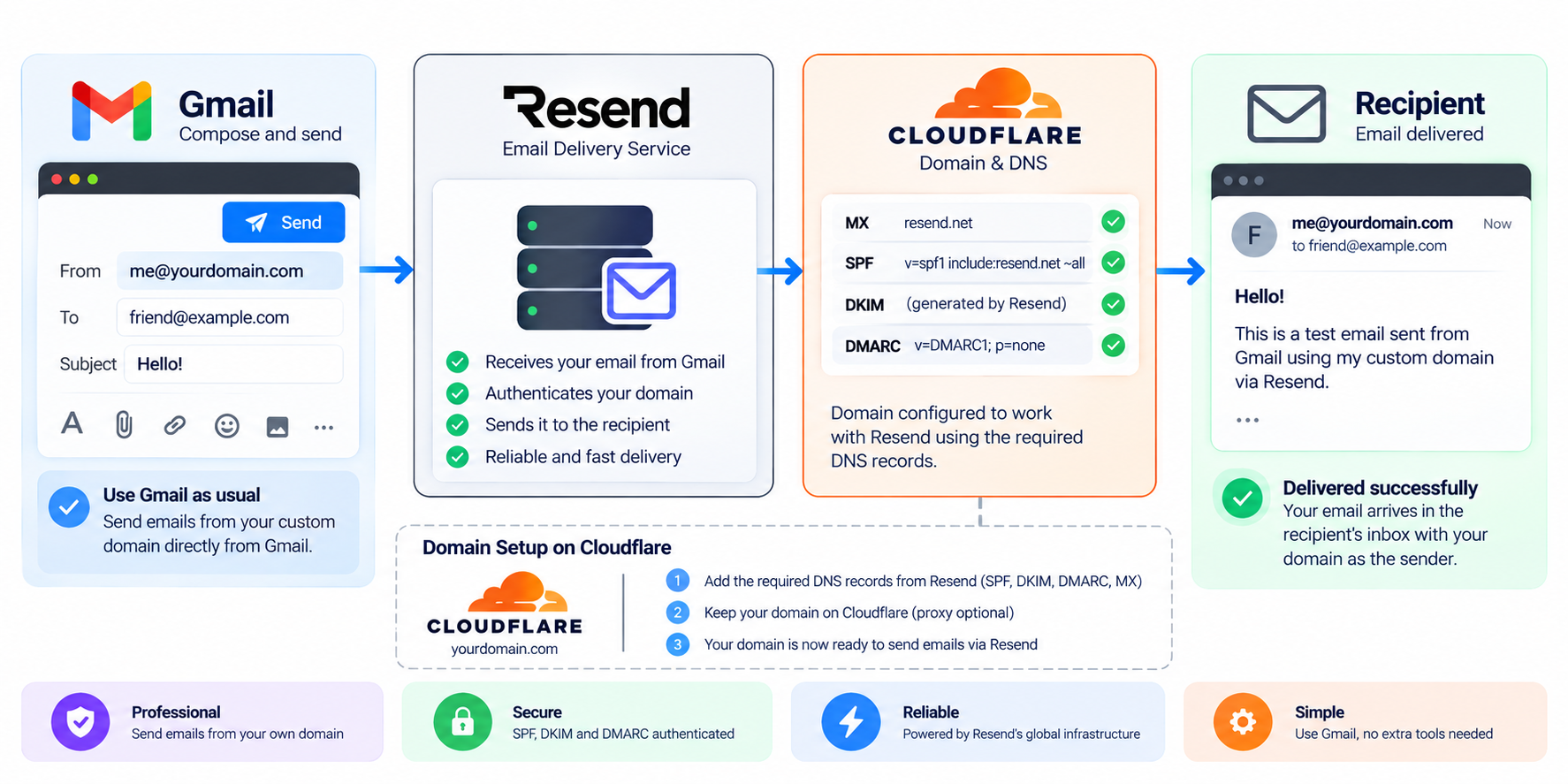
Cloudflare Email Sending is not available for free, so I use Resend for this part.
The free plan is more than enough for personal usage:
$0 / month
3,000 emails / month
100 emails / day
3 domains
10,000 automation runs
30-day data retention
The process is:
- Create a Resend account.
- Verify the domain.
- Add the DNS records provided by Resend to Cloudflare.
- Configure the SMTP credentials in Gmail’s “Send mail as” settings.
Once this is done, Gmail remains the only interface I use. When I compose a message, I can choose which address on my domain should appear as the sender.
What this changes in practice
This setup gives me a small but useful control panel for my online identity.
I can create a dedicated address for every service:
spotify@mydomain.com
youtube@mydomain.com
h-and-m@mydomain.com
If a service sells or leaks my address, I know exactly which address was involved. If the spam becomes unbearable, I can block or remove that route in Cloudflare and move on.
No migration. No new inbox. No need to change my real personal address everywhere.
A small system with a big payoff
This is not a complicated infrastructure project. It is just DNS, email routing and a small amount of filtering logic.
But it changes the relationship I have with my inbox. Instead of giving every website the same permanent address, I give each one a controlled entry point.
The result is less spam, better traceability and a much easier way to revoke access when something goes wrong.
Your personal email address should be a way to contact you, not a permanent subscription to everyone else’s marketing list.
Need help setting up your personal email? Or do you simply want to talk about this topic? Send me an email at hidemyemailpost@mattao.net 😉